
Cinesound The View
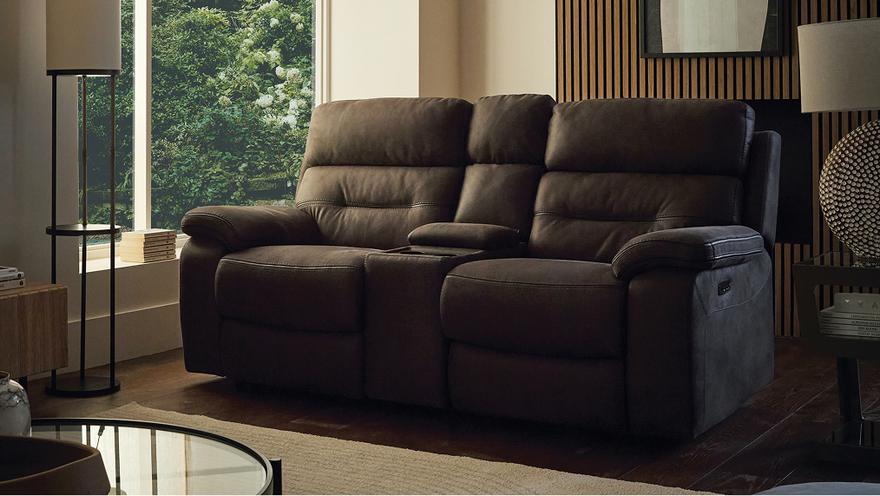
Packed with tech and super comfortable, The View cinema sofa is the best seat in the house. Discover luxurious recliner seats, with the option to upgrade to cinema-ready features – including bluetooth audio, 4D vibration, wireless charging, and much more.
Cinema-ready features
Bring the big screen experience right into your living room with smart features designed for the ultimate immersive movie night.

Integrated cup holders
Positioned right in arm's reach, these integrated cup holders keep your drink of choice right where you want it.

Handy control panel
No more digging for the remote. Control volume, change tracks and more with built-in control buttons, right on your sofa.

Hidden surround sound speakers
Elevate your watching or gaming experience with hidden speakers underneath each seat and behind the storage console - delivering crystal clear surround sound.

Built-in wireless charging
A wireless device charging pad, and USB and USB-C charging ports - right on the sofa console - ensure your handheld device doesn’t run out of battery.

Vibrating 4D cinema seats
Discover the next level of 4D cinema, with seats that vibrate in time to music and sound effects - for a truly immersive experience.

Hidden storage
Convenient, concealed storage right in the centre of your console, so you never miss any of the good bits.

Individually controlled reclining seats
Enjoy it your way – each seat can be individually adjusted, from telescopic headrests and power reclining, to Bluetooth sound and vibration.

Classic big-screen style
Timeless, plump seats and an assured profile mean The View is classically cosy. Foam and fibre coil-sprung cushions promise bounce-back support you’ll spend many a movie night on, while your choice of an elegant faux suede or two luxurious leathers ensures a red carpet ready look.


2 year guarantee on all moving elements
Packed with premium, high-tech features
Want to get your home cinema started ASAP?
The View Express can be delivered to your door in as little as 14 days – ready for lights, camera, action!
How to use your The View sofa
With so much tech, there’s lots to love about Cinesound’s The View sofa. Discover our quick tips and tricks below to get the most out of your home cinema experience.
While you’ll have access to great features like power reclining and adjustable headrests on all our The View powered sofas and chairs, to unlock the full capabilities, you’ll need to purchase a sofa or chair with a console or arm console included.
Plugging in
Plug your sofa into the mains, and ensure it’s switched on at the socket and at the switch on the back of the console (this will glow red when the power is on).
Turning on
Hold down the power button on the console for 3 seconds, until you hear “Power on” and the buttons turn blue.
Reclining seats and adjustable headrests
Controls for the reclining seats and adjustable headrests can be found on the outside arm of sofas with main consoles, and down the side of the seat cushion on sofas with arm consoles – push these to adjust your seating and head position.
Connecting your device
Your sofa is ready to pair whenever it’s turned on with blue buttons. To connect your device, turn on Bluetooth mode and select “Homestage Max” from the list of devices. Hold down the Bluetooth button until you hear “Bluetooth disconnect” if you want to change the connected device.
Playing media
You can control audio from your device as normal, or by using the buttons on your sofa’s console. To pause or play audio, short press the bluetooth button; you can also increase and decrease the volume, and skip tracks forward or backward, using the relevant buttons on the console.
Vibration mode
Short press the vibration mode buttons on your console to independently control vibration on each seat of your sofa.
Cup holders
Press the cup holder button on your console to independently lower the cup holder bases. If you spill any liquids on this area or your drinks cause any condensation, we advise wiping it up straight away, as it can interfere with the wireless charging pad technology.
Charging functions
Your The View sofa has several charging options: USB, USB-C, and wireless. Place your device on the wireless charging pads, or plug into the USB/USB-C ports on the control panel or console. The USB port in the arm console has a retractable dust cover – push this forward to connect your device.
Broadcast mode
Broadcast mode lets you connect and synchronise multiple Showcase sofas. Short press the broadcast button on your main console to turn on this mode – it will initially flash for 30 seconds, then stay steadily lit blue – then turn your other sofa(s) on and press the same broadcast button.


